
Z-Height: how it’s done
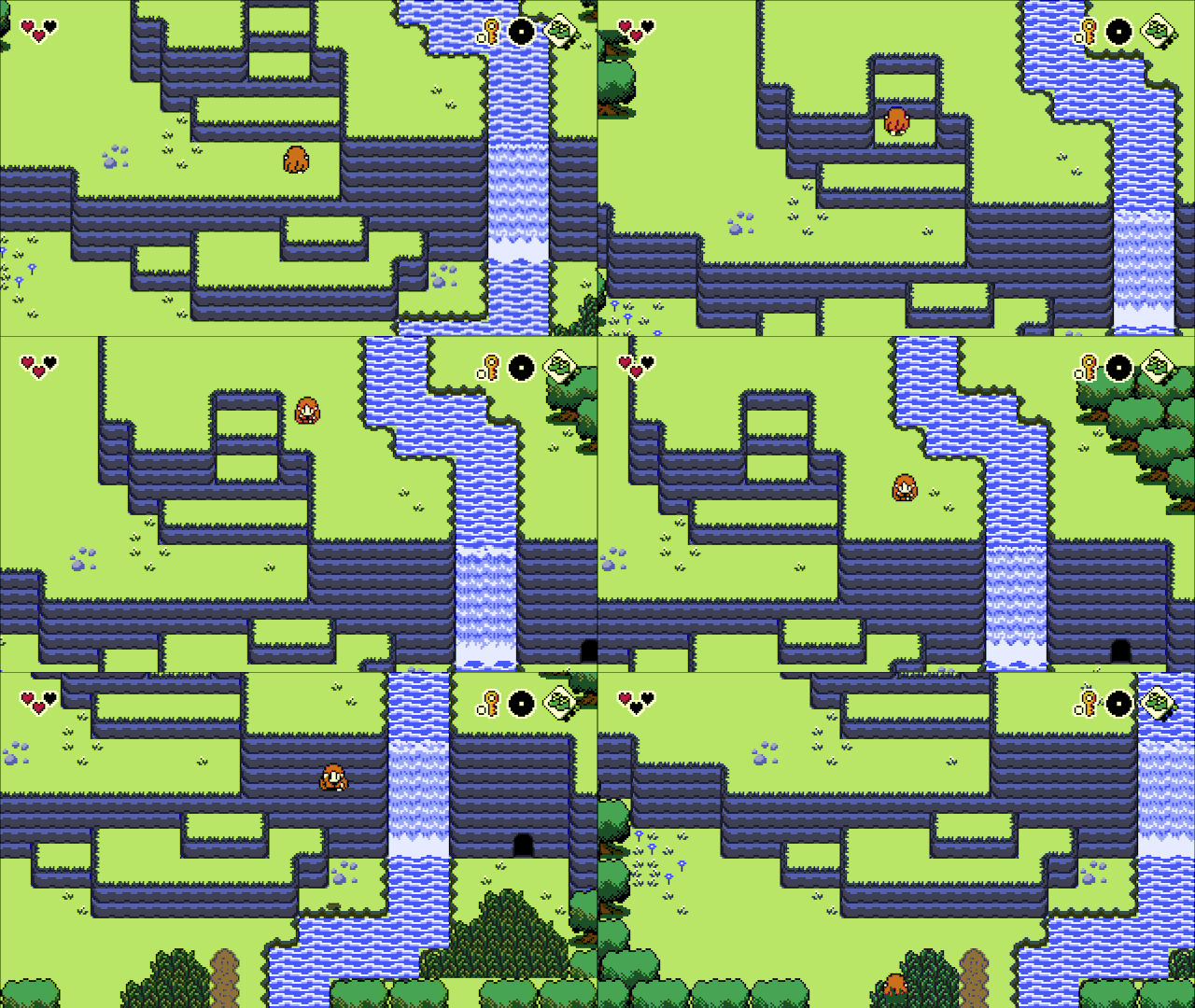
I’ve been asked a few times now how the new height system in ProtoDungeon/The Waking Cloak works, and I think it’s a good time now to write it out!
This system was something I’d been tossing around for a while, but I wanted the boots (the jump item) to be able to go up and down cliffs properly. Alundra(a great Zeldalike PS1 game with lots of jumping around) inspired me and convinced me that it could be done.
If you’re familiar with the x and y axis in 2D games, you may also know about the z axis for 3D games. Since PD/TWC are 2D games, we will have to fake the z axis…
So first, this system is based off a method by a GameMaker developer who goes by Matharoo on YouTube. Matharoo does a lot of great tutorials and example projects, so go check him out. The z-axis tutorial in question is here. I fully recommend watching this and playing with the provided example project before attempting any of this, since my system uses it as a foundation.
Laying the “ground”work (ah ah ah)
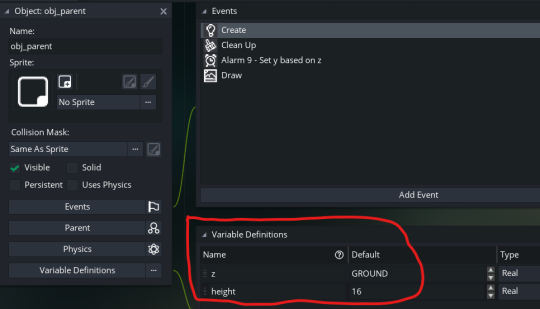
In GameMaker, you can set up parent-child inheritance. I already had a generic obj_parent that every object in the game inherits from. I gave that a “z” variable and “height” variable, meaning every object now has these variables. Since my base objects are 16x16 pixels, I decided the default height would also be 16 pixels.
Drawing
The next part is how to draw objects. Since we’re working in fake 3D (we still actually only have x and y, axes… remember z is kind of a faux axis). Generally speaking, you want jumping to look like the player is moving up, falling would look like moving down. This means the y axis will have to do double duty, handling both y and z. This sounds complicated, but it’s not! Basically you want all your objects to draw their sprites at (x, y - z) instead of (x, y). In GameMaker, you can do this with draw_sprite(sprite_index, image_index, x, y - z); in your parent object’s draw event.
The Ground
It took me a long time to get to this conclusion, but we really don’t want to deal with negative z (it changes the calculations for depth and so on, all around way more complicated). This is consistent with how GameMaker handles x and y. The top left corner of each room is (0, 0), where x increases as you move to the right, and y increases as you move down (a bit weird coming from most graph layouts, but you get used it it). You can’t go below 0 for either x or y, so I went the same way for z. This means that if we want to actually go “down” on the z axis from sea level, the default ground/sea level has to be higher than 0. I set up a macro for the ground to be at 96, then I use this in the ground calculation script as well as the z-height objects.
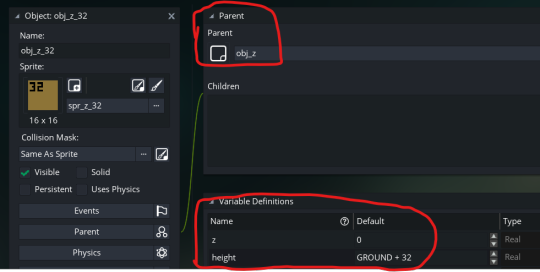
Alright, so z-height objects. You’ll want something that can be walked on but also may serve as a “wall” (cliff, etc.). My base object is called obj_z and has variables that can be overridden by child objects. For all of these, z is 0 (though if you want floating platforms, this can be changed). For the base object, the height is GROUND, i.e. sea level macro. obj_z__8 has a height of GROUND - 8, obj_z_16 has a height of GROUND + 16 and so on. I created objects and sprites for each increment of 8.
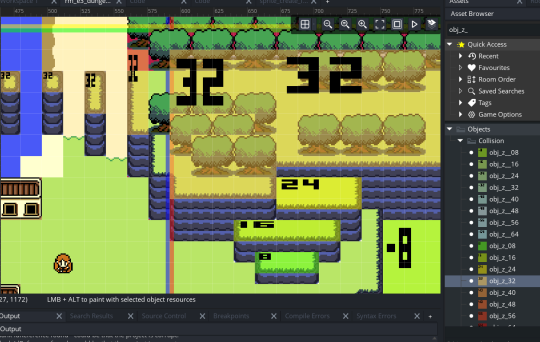
Now for one of the most complicated parts here: generating the z-height colliders. On creation, the z-height objects generate a sprite based on the tiles below it (I don’t really want to go into this, it doesn’t work perfectly) and then creates a bounding box. It’s a little hard to describe how/why this is placed the way it is, but I’ll draw it for you. Note that these bboxes are represented here up by -96 pixels (my GROUND constant) so that they can be seen. In reality, all these bboxes are 96 pixels down from where you can see them now due to the y - z drawing. Remember, the y-axis is handling both y and z.
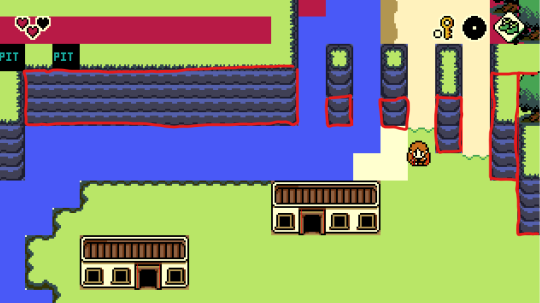
Here’s a link to sprite_create_from_tiles() which creates this sprite and bounding box. I run this once for each z-height object.
From there, detecting the ground isn’t complicated in theory, though mine has a lot of funky edge cases. I won’t go through all that. In short, I created a script called ground_z_get() that checks for collision with z objects. If it finds a collision with one, that’s the ground. If not, the ground is set to the default ground macro.
Gravity
This is a pretty simple matter. We need to apply gravity. You can do this a lot of ways, but since I already have xSpeed and ySpeed variables, I added a zSpeed variable. Most of the time this is 0 unless you’re jumping.
var _groundZ = ground_z_get();
if (z > _groundZ)
zSpeed -= gravitySpeed;
if (z + zSpeed <= _groundZ)
{
zSpeed = 0;
z = _groundZ;
}
z += zSpeed;
Jumping
Jumping is actually pretty easy with this system, assuming you include 3D collision, which we’ll talk about later. Jump simply modifies the object’s zSpeed (there are actually a handful of ways to do this; I personally am controlling the exact z with an easing function vs modifying zSpeed).
Depth sorting
I still don’t have this quite working yet. Cliff objects set depth to -bbox_top every frame, actor objects set depth to -bbox_bottom every frame. Directly modifying depth this way is no longer ideal in GMS2, but I haven’t invested any energy yet into better performing depth sorting methods.
Collision
I created a group of scripts that should be called for all objects that need to collide in 3D. I’m just calling the standard collision scripts but adding an extra check to see if the z + height of the object is within the z + height of the collider.
However! There is a pretty big wrench in here. The 2D collision scripts that come with GameMaker mostly only check against the first object they find. That means if there are multiple stacked objects (say, a z height object and an NPC on top of that), the collision script could pick either the z height object or the NPC. If it picks the z height object, the 3D check would return false, and it wouldn’t check collision against the NPC. That’s bad. Instead, all these scripts need to use the list collision scripts that are built in and check 3D against all of them.
To prevent the overhead of creating and destroying a ton of data structure lists every frame, I create these lists on obj_parent during create and destroy them in the cleanup event.
With all that in mind, here’s the 3D collision scripts.
If you want to use standard 2D collisions without the third dimension, you will need to check the collision at (x, y - z) instead of (x, y).
——————–
That’s that! Let me know if you have any further questions. This is a pretty complicated system, and I’m still ironing out a few wrinkles.
Peace.
Also posted on Tumblr.