
Hello i seem to be having a similar problem you
Hello! I seem to be having a similar problem you had with the palette swapping. My objects need to change their depth. How did you apply the shader to the full application surface? Thanks for your time!
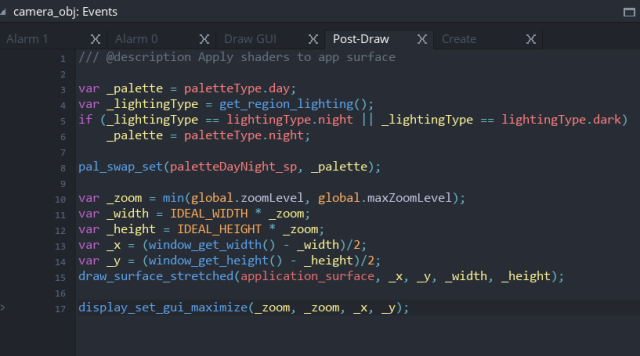
This took me a fairly long time to work out and several conversations with PixelatedPope. The best places to do it is in the Post Draw step of whatever object is doing your drawing (camera_obj handles most of my stuff in that regard). It isn’t as hard if you’re not doing subpixel scaling, but I am, so I had to ass some extra funky scaling stuff. You may not need to do quite this much:
As mentioned, this is in Post-Draw event. The important part here is pal_swap_set before draw_surface_stretched.
In short, if you’re not doing scaling and don’t care about the GUI, all you should need is this in Post-Draw:
pal_swap_set(my_pal_sprite, current_pal, 0);
draw_surface(application_surface, 0, 0);
pal_swap_reset();
Because I’m applying my palette swap to the GUI as well, I moved pal_swap_reset() in the Draw GUI End event, which is is the very final event that runs each step.
Also VERY IMPORTANT. At the beginning of the game (I do it with my initializer_obj in the Create event), you need to disable automatic drawing of the application surface with application_surface_draw_enable(false); This is because you’re manually drawing it in that Post-Event now, so you don’t want the game to do it automatically.
Let me know if that makes sense!!
Also posted on Tumblr.