
Hi big fan of your work and excited for your
Hi! Big fan of your work and excited for your game. I was wondering – do you use a specific tool for screen capturing and making gifs?
Thanks! :)
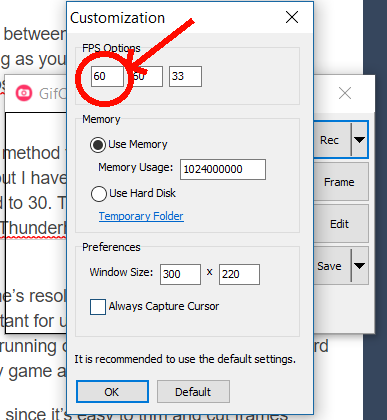
So yes! I’ve kinda flipped between tools, but have settled on GifCam for now. Simple to use as long as you pay attention to the framerate you’re recording at (it defaults to 10fps for some reason, but this can be changed in “Customization”):
You can also record at 60fps, but the method to do this is slightly weird. My game in GameMaker runs at 60fps, but I have a key to toggle what I call “gif mode,” which halves the room_speed to 30. Then I make sure GifCam is set to 60fps and record. I learned this method from @ThunderhorseCO on Twitter–some of their gifs are so smooth.
Keep in mind that viewing this gif on Windows will not appear to be running at the correct speed. I have no idea why. Should be fine when you upload it.
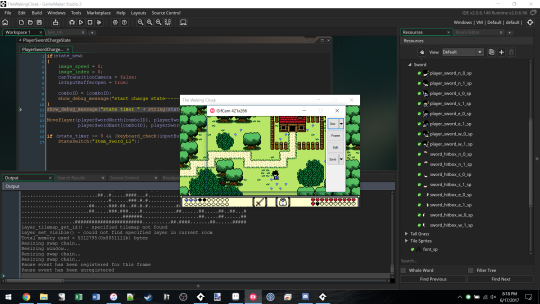
It’s also a good idea to lower the game’s resolution and not run in full screen. This keeps the gif’s size down (important for uploading to the interwebz), and keeps GifCam from freaking out and running out of memory. I’ll generally record only part of the screen, and/or run my game at around 640x360 res:
You can edit with GifCam, but sometimes I’ll also edit with Aseprite, since it’s easier to trim and cut frames!
A few more tips.
- If your gif ends up being bigger than 3-5 mb, convert it to mp4 and upload it as a video. I’ve used this tool before.
- Tumblr will change your gif to a static image if it’s bigger than 1mb, because tumblr hates gifs. An mp4 video should help you here!
- Sometimes it’s just easier to manually create gifs in a program like Aseprite. This is what I do for mockups and for the recent combat gifs. They’re so much smaller in terms of filesize. This helps me plan out what I want the game itself to do!
Also posted on Tumblr.